LFO page
The LFO page of Absynth 6 lets you configure up to three LFOs as additional modulation sources.
The LFO page of Absynth 6 lets you configure up to three LFOs as modulation sources for a wide range of different controls across the instrument. LFOs, or low frequency oscillators, produce periodic modulation signals that can be used for slowly evolving or rapid movements of controls.
To open the LFO page, click the LFO button at the top of the Absynth 6 window:

Each of the three LFOs on the LFO page consists of the following controls and sections:
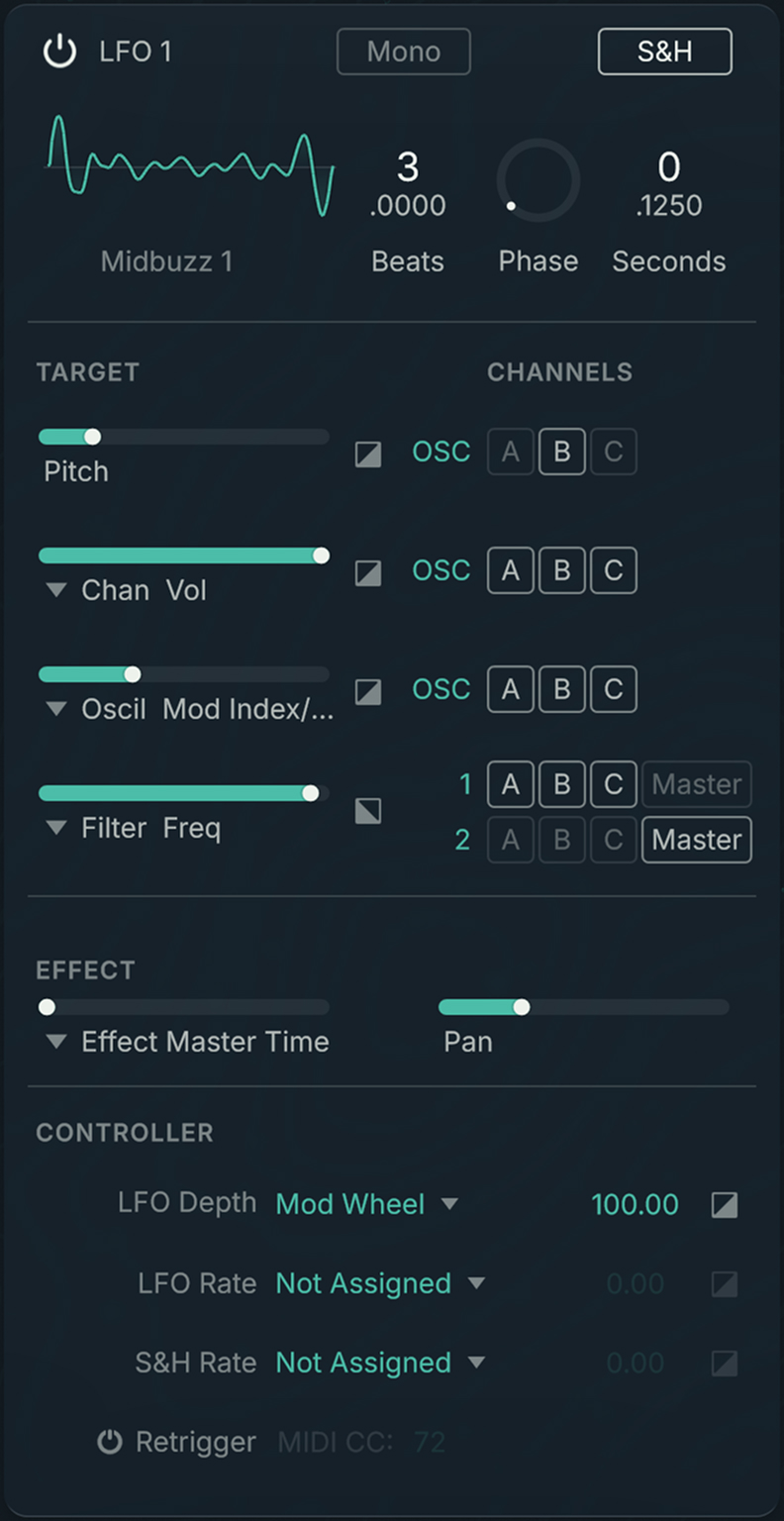 |
LFO On/Off: Switches the LFO on or off. When switched off, the LFO does not produce a modulation signal.
Mini Waveform: Shows the shape and the name of the loaded waveform. If a Morph waveform is loaded, you can click the shape and drag your mouse vertically to morph the waveform. Clicking the waveform name opens the Waveform selector and lets you choose another waveform.
Mono/Poly: Switches the LFO between monophonic and polyphonic operation. When switched to Mono, the LFO modulates all the voices produced by the instrument. When switched to Poly, each voice is modulated by its own individual copy of the LFO.
LFO Rate: Adjusts the speed of the LFO either in time intervals (Seconds) or quarter notes synced to the host tempo (Beats). You can switch between Seconds and Beats by clicking the label.
Phase: Adjusts the initial phase position of the LFO.
S&H: Switches Sample-and-Hold mode on or off. When S&H is active, the modulation produced by the LFO is turned into a staircase waveform by holding its momentary values at a frequency set using the S&H Rate control.
S&H Rate: Adjusts the frequency of the Sample-and-Hold mode when S&H is active, either in time intervals (Seconds) or quarter notes synced to the host tempo (Beats). You can switch between Seconds and Beats by clicking on the label. The sample-and-hold frequency determines how often and for how long the values of the modulation are held.
Target section: Lets you assign the modulation from LFO to controls on the Patch page You can find more information in Target section.
Effect section: Lets you assign the modulation from the LFO to the Effect page and the panning. You can find more information in Effect section.
Controller section: Lets you assign the modulation from the Macro controls the LFO. You can find more information in Controller section.
Target section
The Target section lets you assign the modulation from the LFO to the pitch of the instrument, along with three flexible assignments for controls on the Patch page.
The Target section consists of the following controls:
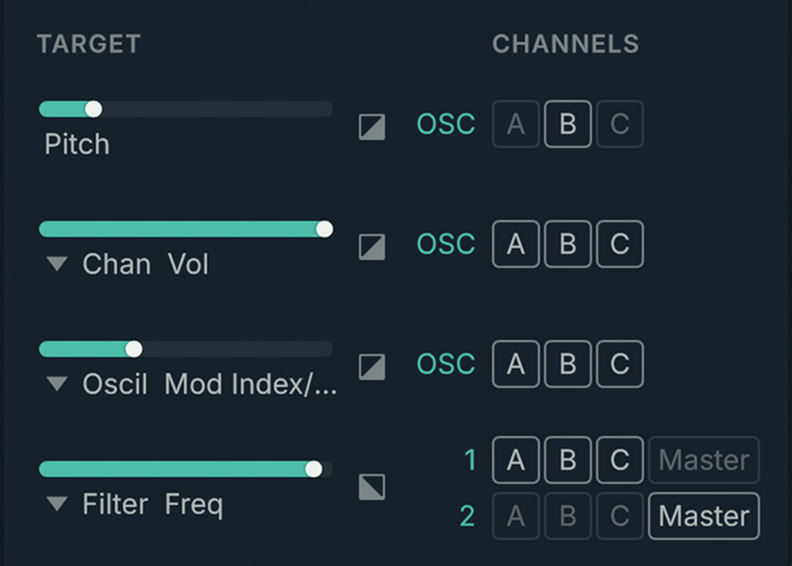 |
Pitch: Adjusts the amount of modulation applied to the pitch of the instrument.
Modulation amount: Adjusts the amount of modulation applied to the control assigned using the Modulation Target selector.
Modulation Target selector: Assigns the modulation from the LFO to a control on the Patch page.
Invert: Inverts the phase of the modulation for the respective assignment.
Channels: Routes the modulation from the LFO to the channels on the Patch page. The modulation will be applied to the assigned control on all selected channels.
Effect section
The Effect section lets you assign the modulation from the LFO to the panning of the instrument, along with a flexible assignment for a control on the Effect page.
The Effect section consists of the following controls:
 |
Modulation amount: Adjusts the amount of modulation applied to the control assigned using the Modulation Target selector.
Modulation Target selector: Assigns the modulation from the LFO to a control on the Effect page.
Pan: Adjusts the amount of modulation applied to the panning of the instrument. Both left-right panning as well as front-back panning in surround configurations is supported.
Controller section
The Controller section lets you assign modulation from the Macro controls to the LFO itself. You can modulate the following parameters: LFO Depth (the amplitude of the LFO oscillations), LFO Rate, and S&H Rate (these two parameters are described in LFO page).
The Controller section consists of the following controls:
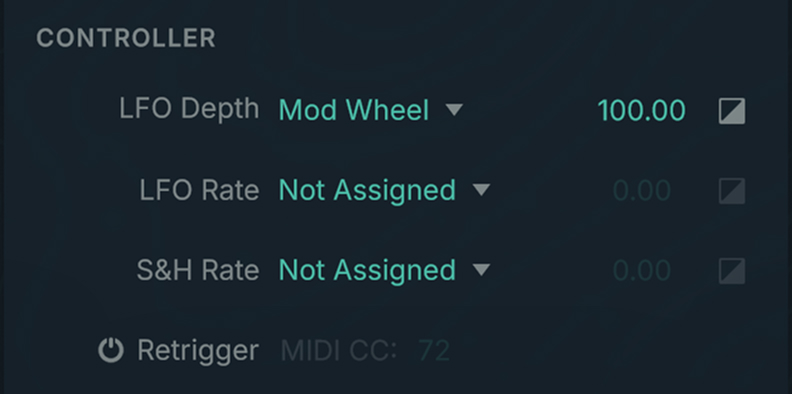 |
Each LFO parameter that can be modulated provides a row with the following controls:
Modulation Source selector: Assigns the modulation from the selected Macro control to the respective LFO control.
Modulation amount: Adjusts the amount of modulation applied to the respective LFO control from the Macro control selected using the Modulation Source selector.
Invert: Inverts the phase of the modulation for the respective assignment.
Retrigger on/off: Only applies when the LFO is in monophonic mode (Mono displayed at the top of the LFO). In monophonic mode the same LFO modulates all the voices of the instrument: The LFO starts with the first note and keeps running as long as notes are playing. If you activate Retrigger, you can reset the phase of the LFO to its start position (defined by the Phase parameter) by setting a MIDI continuous controller to any value higher than 0. You can specify the desired MIDI continuous controller using the MIDI CC parameter.
Note
When the LFO is in polyphonic mode, each voice of the instrument triggers its own copy of the LFO, no matter if Retrigger is active or not.